
 This deployment guide on the Citrix Community site provides instructions for configuring Citrix Virtual Delivery Agent (VDA) for macOS with MacStadium’s Cloud Compute services. MacStadium partners with Citrix to support this workflow.
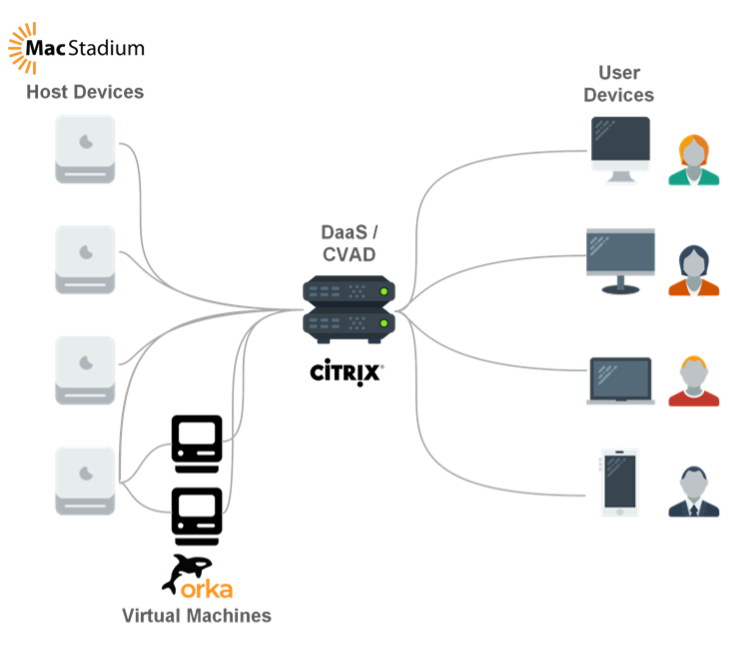
The macOS VDA is launched through the Citrix Workspace app on user desktops. MacStadium provides Cloud Compute resources, while customers must obtain Citrix licenses independently. The deployment can be done with or without a Mobile Device Management (MDM) tool.
This deployment guide on the Citrix Community site provides instructions for configuring Citrix Virtual Delivery Agent (VDA) for macOS with MacStadium’s Cloud Compute services. MacStadium partners with Citrix to support this workflow.
The macOS VDA is launched through the Citrix Workspace app on user desktops. MacStadium provides Cloud Compute resources, while customers must obtain Citrix licenses independently. The deployment can be done with or without a Mobile Device Management (MDM) tool.
MacStadium Bare Metal with Citrix
Citrix macOS VDA on MacStadium
Deploy Citrix VDA for macOS on MacStadium bare metal. Links to the full deployment guide on Citrix Community, plus licensing tiers and support information.
This deployment guide on the Citrix Community site provides instructions for configuring Citrix Virtual Delivery Agent (VDA) for macOS with MacStadium’s Cloud Compute services. MacStadium partners with Citrix to support this workflow.
The macOS VDA is launched through the Citrix Workspace app on user desktops. MacStadium provides Cloud Compute resources, while customers must obtain Citrix licenses independently. The deployment can be done with or without a Mobile Device Management (MDM) tool.